A landing page from scratch, Content Hamper, and a blog studio: what's new in Apro
Most of this release comes from watching people use A-pro and noticing where they got stuck. Some didn't have a website to start from. Many had good raw material (a line from a client call, a stat, a half-formed idea) but no time to turn it into posts, and nowhere to keep it until they did. Some wanted to go beyond social posts. And nobody could see or change what Apro "knew" about their business. This release takes on each of those.
Landing pages for businesses with no website
If you don't have a website, you can now start from a landing page instead of a website analysis.
Choose the no-website option when you add a project. Apro explains what you'll get, then walks you through it:
- Tell us the basics. Business type (B2B or B2C), what you offer, social handles, location and hours, and photos.
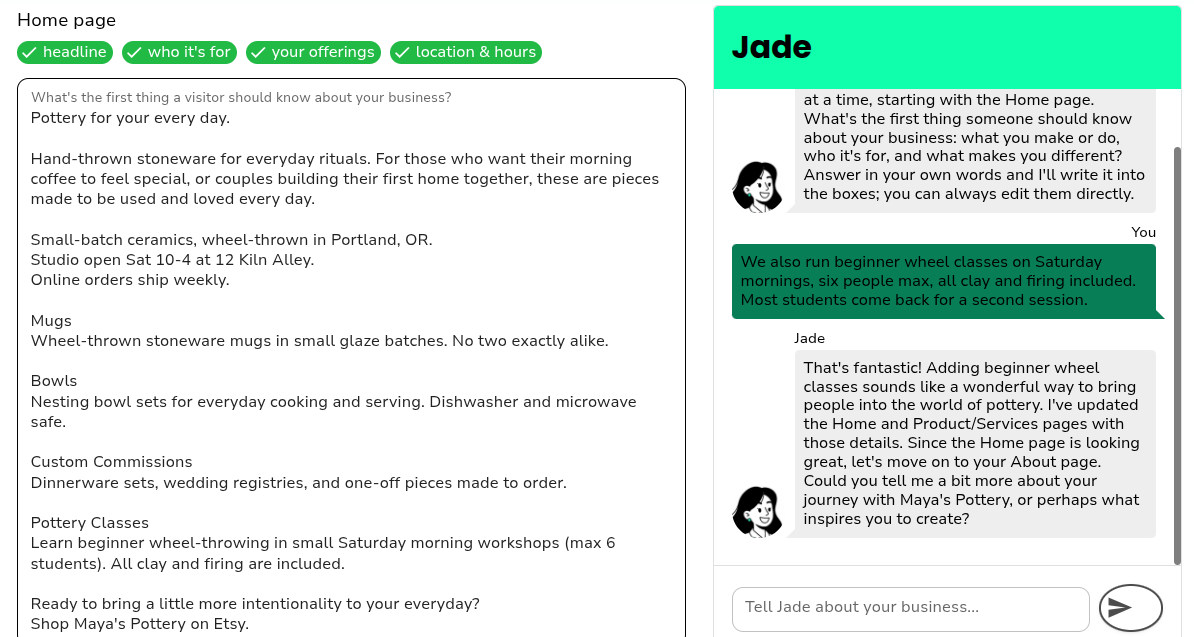
- Write the page with Jade. You and Jade co-write the text for your landing, About and Product pages on a single canvas. Talk to Jade loosely and she drafts into the boxes, and you can edit any box directly. There's also a "Have Jade write a first draft" shortcut if you'd rather start from something.
- Pick a Brand Look. Upload a logo, then choose from five palettes and five font pairings, or let Jade pick.
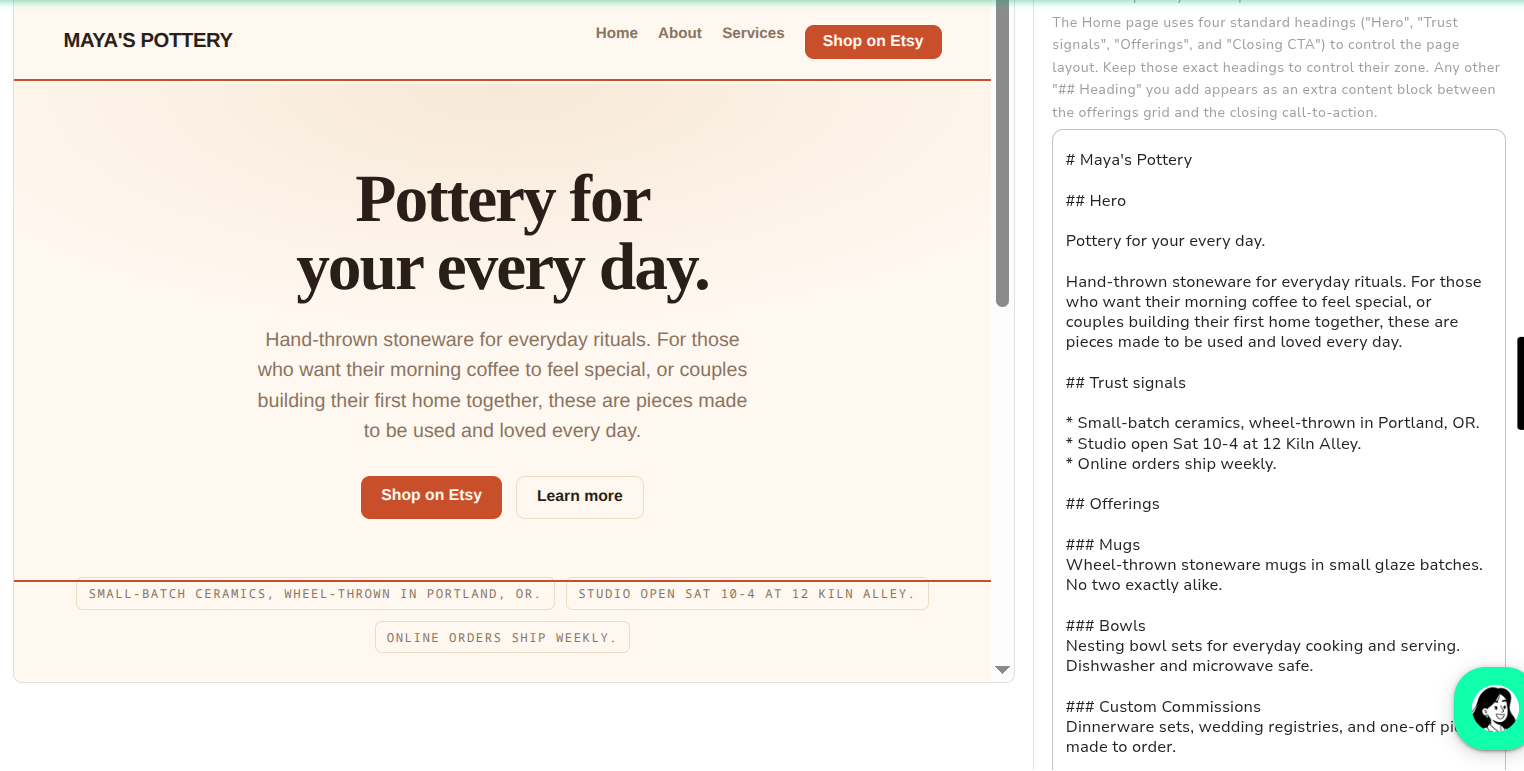
- Edit on the real page. The preview is your actual page, not a mockup. Click any section to jump to its text and edit it.
- Choose what visitors do next. Add up to three buttons (email you, go to a social profile, go to your shop, or fill in a contact form) and mark one as primary.
- Publish. Choose a name and your page goes live at its own address on Apro's domain, with basic SEO and social-sharing details filled in.
Your answers also seed your project's knowledge, so when you move on to strategy and campaigns, Apro already knows your business. Published pages can be shown in English or Traditional Chinese.
After you publish
Once your page is live, you get three new tools.
- Contact form and Leads. Add a contact form as one of your buttons. Messages are stored in a Leads list on your project page, you get an email for each one, and you can mark leads as contacted.
- Page stats. Your dashboard shows how many people visited your page this week.
- Launch kit. One click gives you launch posts for your social platforms, a downloadable QR code that points to your page, and a draft announcement email to copy. The posts arrive as a normal campaign that you review and schedule yourself.
Content Hamper: somewhere to put raw material
The best marketing material rarely shows up as a finished brief. It shows up as a sentence a customer said, or a number from a report you read last week.
The Content Hamper (in the main navigation) is an inbox for exactly that. Type or dictate a note, or hit Save to hamper on any Jade chat reply. Jade distills each note into a few bullets and themes, and never rewrites what you wrote.
When you're ready, click What should I make? Jade proposes ideas built from your notes, and each idea shows:
- a title and the reasoning behind it,
- the notes it's based on, quoted word for word,
- a format: a single post, a blog post, or a four-part campaign. Jade suggests one and you can change it.
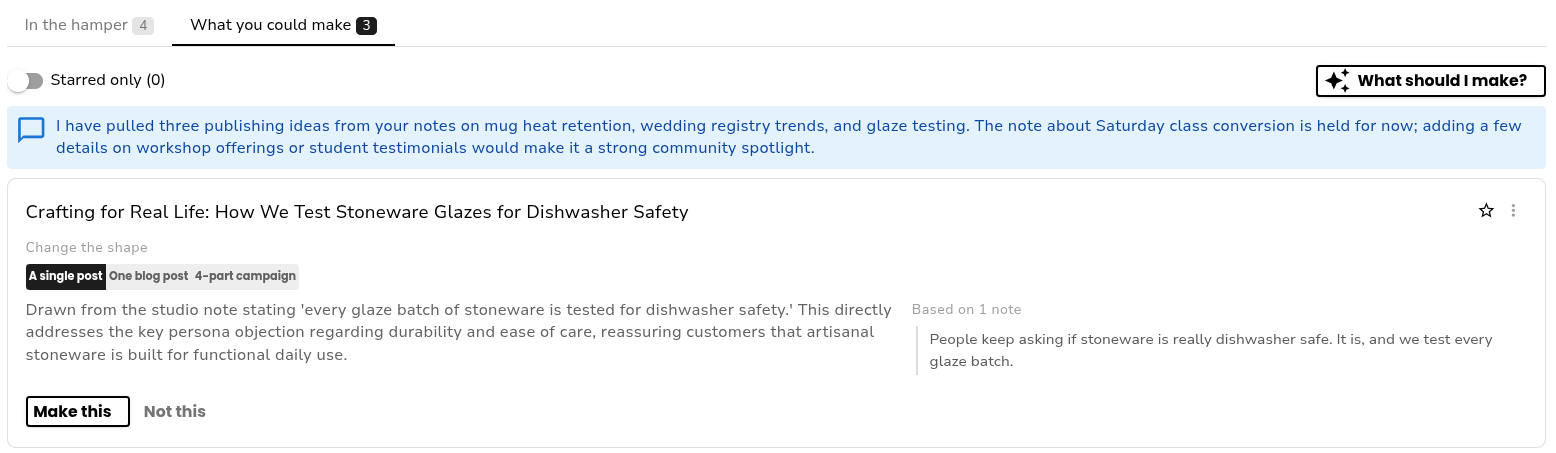
Click Make this and you land in the right place: the content editor, Blog Studio, or the campaign dialog, with your notes already attached. Star ideas you want to come back to, or choose Not this and Jade won't pitch that grouping again. Ideas you ignore for 30 days expire and their notes return to the pool.
Blog Studio: from idea to publishable post
Blog Studio (also in the main navigation) is a six-step editor:
- Brief: what the post is about, who it's for, and what you want readers to do.
- Keywords: Jade suggests keywords with volume and difficulty. You pick one primary and up to three secondary.
- Outline: choose from three outlines, then reorder, edit, or tick which sections should get an image.
- Draft: Jade writes each section and a header image. Each section has quick adjustments (like shorter, more casual, or add a call to action).
- Images: regenerate any image, or swap in a photo from your media library.
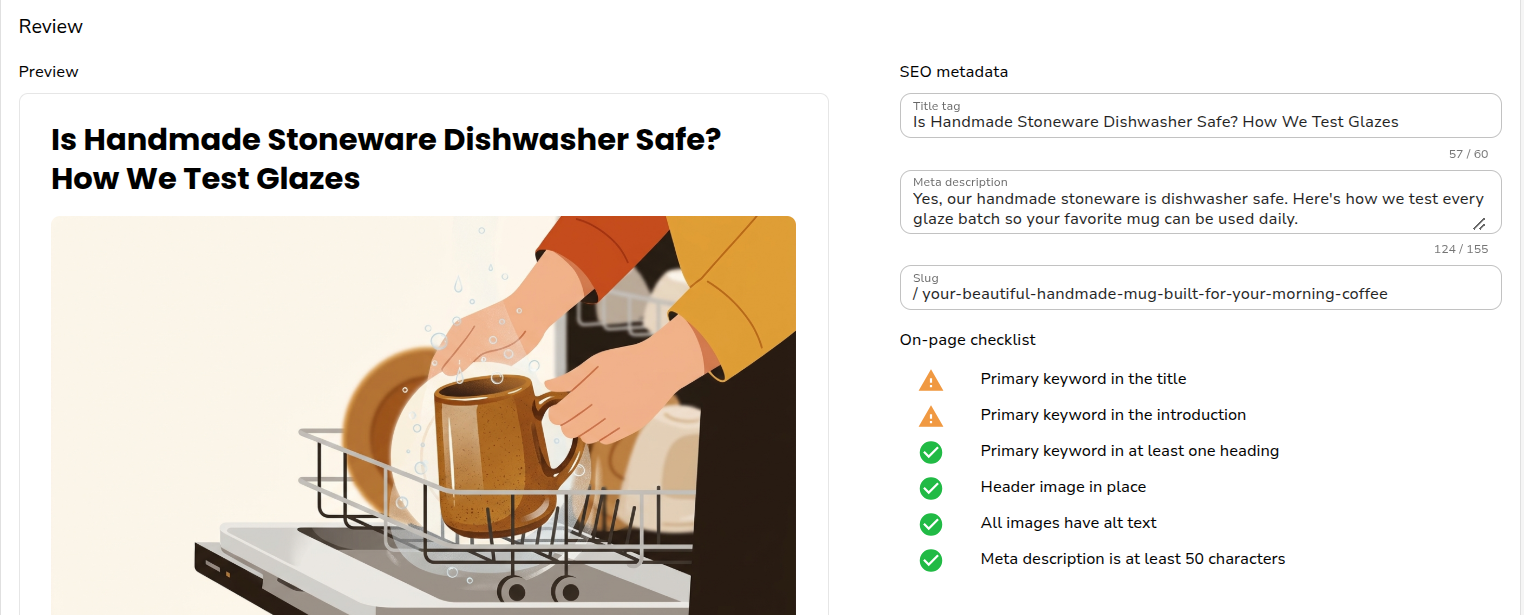
- Review: preview the post next to its SEO fields (title tag, meta description, slug) and an on-page checklist. Mark it publishable, copy it as Markdown or HTML, and record the live URL once it's published.
Studio works in English, Spanish (Spain and Mexico), Japanese and Traditional Chinese.
Campaign Knowledge: see and steer what Apro knows
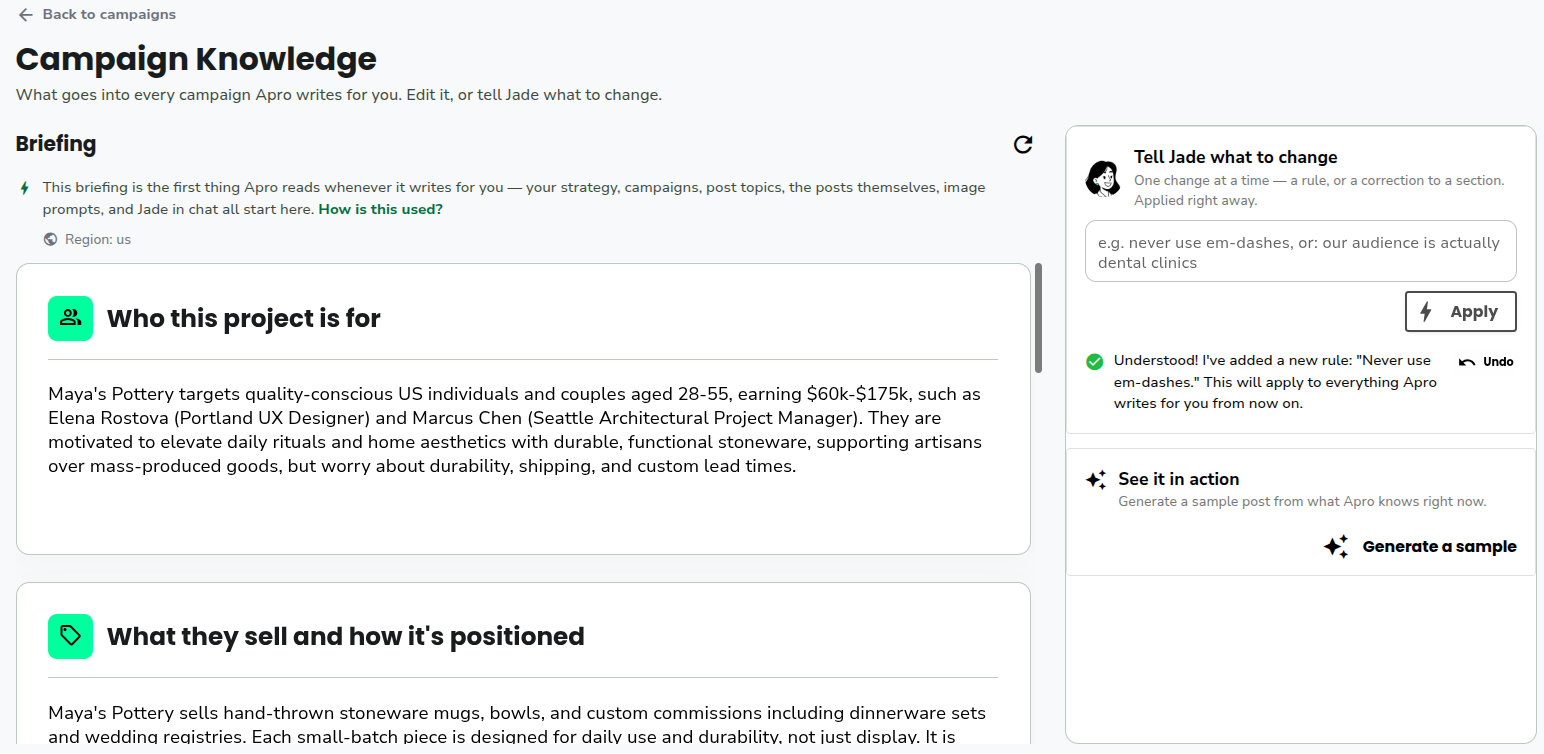
Apro builds a briefing for every project: who it's for, what you sell, where you are now, what you're trying to do next, and your voice and constraints. That briefing feeds your campaigns and content. Until now you couldn't see it.
Campaign Knowledge is now a page you open from your campaign list. You can read the briefing, reword any part of it, and add standing rules, such as "never use em-dashes", with an undo if you change your mind. A rule you add applies to your next generation, so you don't need to repeat it in every campaign.
Interviews, where Jade asks you questions, now happen when you create a campaign, and Jade no longer wraps up while a question is still on screen.
Try it
Open Apro and look for Content Hamper and Blog Studio in the navigation. Campaign Knowledge is on your campaign list page. No website yet? Choose the no-website option when you add a project, and you'll have a landing page to build on.
We'd like to hear what works and what doesn't, so tell us in the app.
Minor changes
Setup
- Resume where you left off. If you leave onboarding partway, a "Finish setting up" card on your dashboard takes you back to the step you stopped on.
- "Add Project" starts fresh. It no longer opens the old wizard or reuses your previous project's answers.
- Setup finishes reliably. We fixed a bug that could misjudge whether you'd finished setup or send you back to the wrong step.
Campaigns
- Improved campaign creation flow
Traditional Chinese
- More of Apro in Traditional Chinese. Campaign messages that zh-TW users were seeing in English are now translated, and the landing-page flow has a first pass of Traditional Chinese text.